Lab 01: Introduction to Python Programming and Basic Syntax
This lab will serve as a starting point for learning to program with Python. Python is a very easy language to learn for beginners - more so than languages that came before it, such as C++ or Java. That being said, it has several nuances of which when I had to self-learn on my own after my days as an undergraduate student, I had some trouble getting used to. What was supposed to be much more easily understood syntax felt foreign to me after being used to the relatively more complex ones that do not always make sense to beginners on first glance.
However, I will approach the following lab activities as though you are learning to program for the first time. Having been a teaching assistant for the penultimate programming fundamentals course in NUS for about 2 years now, I think I'm more than capable of giving a shot at creating new material surrounding this. While I do not intend on making this as intense as how NUS carries out their IT5001 course, brace yourselves and good luck! 😉
Getting Started
Warning
Before proceeding, it is worth noting that you should have Python and an IDE of choice installed on your machine. If you need a guide on how to do so, feel free to check out any of the available resources online.. or check out mine!
One of the benefits of learning Python first is how little one would need to do in order to create their first program. Let's go with the traditional "Hello World!" first program example - nothing fancy, it is just supposed to print "Hello World!" in the console.
Python Syntax and The "Hello World!" First Program
In C++ and Java, for instance, this first program example would look something like as follows:
As a teacher, one of the first things that come to mind would then be how to explain each part of the syntax, or if I should defer mentioning what each of these parts are until much later when they become more relevant? (I often do the latter back when I was teaching Java to diploma students in Taylor's). However, in Python I can simply do something like as follows:
| hello-world.py | |
|---|---|
Granted, I still gravitate towards thinking if I need to clarify what print() does or what a function is, but it looks much friendlier to one who'd be very averse to looking at so much foreign syntax in one go!
Speaking of which, let's break down what's going on in this seemingly very small program..
We used a special function called print(), which is responsible for causing some text to appear in the output box.
If you know anything about functions in math classes, they typically take in an input and churn out an output via some process.
In this case, the print() function merely just presents whatever we pass into it and outputs it on the console.
Functions are one of many things that make up the Python syntax. We will delve more about them in a future lab activity. Some other things to understand here include variables and data types.
Variables
Imagine small little pigeonholes or mailboxes you can typically find in post offices or in apartments (if you're in Singapore, you dang know what I mean). I liken the idea of variables like that - they are dedicated spaces in memory which contain some values - it can be a number, word, or even what we call a pointer to a different space in memory. Variables are like spaces identifiable by a name you give to them.
Here's an example:
Here, we created a variable we call x, which we then associate with value 3.
We can then modify the value of this variable x into a different number like say, 5.
| Python Shell | |
|---|---|
Unlike many programming languages, you can change it to a different data type, like say a string 'Weegee'.
This is why we can describe Python as a "dynamically-typed" language.
There are specific names you absolutely should not use; they are known reserved keywords. The full list of reserved keywords as of Python 3.6 (reference here) are as follows:
| Python Keywords | ||||
|---|---|---|---|---|
False |
def |
if |
raise |
None |
del |
import |
return |
True |
elif |
in |
try |
and |
else |
is |
while |
as |
except |
lambda |
with |
assert |
finally |
nonlocal |
yield |
break |
for |
not |
class |
from |
or |
continue |
global |
pass |
One of the lab activities here will delve into the repercussions of using one of the reserved keywords.
Naming Convention
In Python, the Snake Case naming convention is preferred.
This entails separating words with lower-case alphabet in a name using underscores _ (otherwise if it's just 1 word, then there's no need to enlist the use of the underscore).
Examples of acceptable names are like as follows: apple, two, number_of_birds, station_321.
The main thing to note when naming anything in Python (from variables to functions and beyond) is that you cannot:
- start with a digit character (e.g.,
9_chickensand06are not a valid name), or - have spaces in the name (e.g.,
number of birdsis not a valid name).
Normally, variable names entail use of lower case alphabets.
For constants, though, there's a case for having all the alphabets in upper case.
Examples include FREE, BLOCKED, and STATION_5_NAME.
You may also employ the Camel Case (and Pascal Case) naming conventions (e.g., numberOfBirds, NumberOfBirds respectively) for naming variables, even though they are not what's considered Pythonic.
I could see the Pascal Case naming convention being used for naming classes though, but otherwise for Python programming, stick to the Snake Case naming convention.
Data Types
The term data type was tossed around quite a lot so far, but what does it mean? As the name states, it represents a type of data recognized by the programming language. Across programming languages (and sometimes spanning across versions of the same language), there are differing number of data types between them all. In Python, specifically, we have "core" data types like as follows:
| Data Type | Description |
|---|---|
int |
Integer (same definition as in math; e.g., 1, 2, 10, -4) |
float |
Floating-point value (any number that does not fit under the definition of int; e.g., 1.1, 3.14, 0.0, -2.5) |
bool |
Boolean logical value (either True or False; capitalize the first letter!) |
str |
String of characters, often surrounded by single (') or double (") quotes |
NoneType |
Basically, just the None value; a special type representing the absence of a value (uninitialized variables have this value by default) |
Other data types include lists, tuples, sets and dictionaries.
Technically, (and I honestly only learnt about this much later after programming in Python for quite a bit), everything including variables are objects. We will revisit what objects mean in a future lab activity, but the gist of it is that variables are not exactly the same as how they are in other programming languages.
To view a variable's data type, we utilize the type() function.
| Example using type() | |
|---|---|
Comments
Notice the use of the hash tag symbols # used so far?
Those are what we refer to as comments - anything marked as a comment will not be interpreted.
Keyboard Shortcut for Commenting Lines
On a typical code editor, hit Ctrl + / (for Windows) or Cmd + / (for macOS) while focusing on a line to comment it out. Hit that keyboard shortcut again to remove commenting from that line.
This can come in handy especially if you wish to start debugging your code.
Comments are handy for relaying useful information.
Single-line comments are as you have seen (they start with #).
Multi-line comments start and end with three apostrophes ''' or three quotation marks """.
'''
An example of a multi-line comment.
This can span multiple lines.
'''

"""
Another example of a multi-line comment.
This can also span multiple lines.
"""
Danger
Do not mix the pairings up! e.g., ''' ... """ or """ ... '''
Python Shell and Console Output
If you installed Python using the official installer from python.org, you should be able to view IDLE as an Application (in the "Applications" folder in macOS, or as one of the programs visible in Windows). Otherwise, something like one of the Terminal commands should do the trick (don't do this unless you're sure you didn't install it with the official installer).
IDLE opens up a Python shell in a GUI interface that's not quite Terminal/Command Prompt like, but a program in itself nonetheless. Alternatively, you get to open the Python shell simply by typing the command below in the Terminal or via a separate program in the Python folder (again, visible if you installed Python using the official installer). Now, what is a Python shell, though?
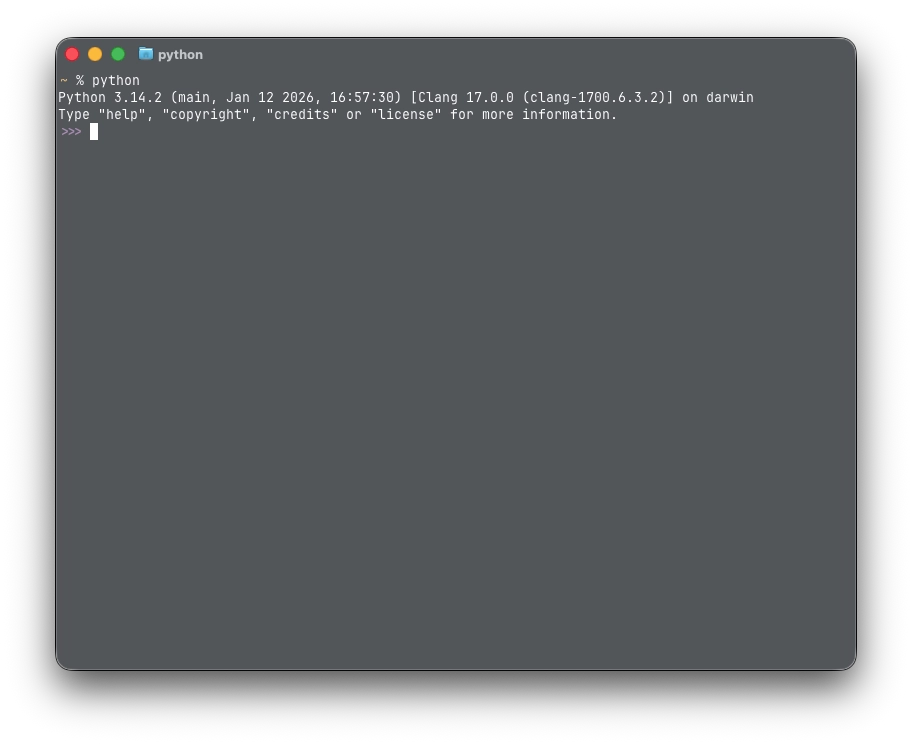
Python Shell and Interpreted Code
The Python Shell is a command-line interface that allows executing Python code one line at a time. One could treat this like some sort of calculator, like as shown here:
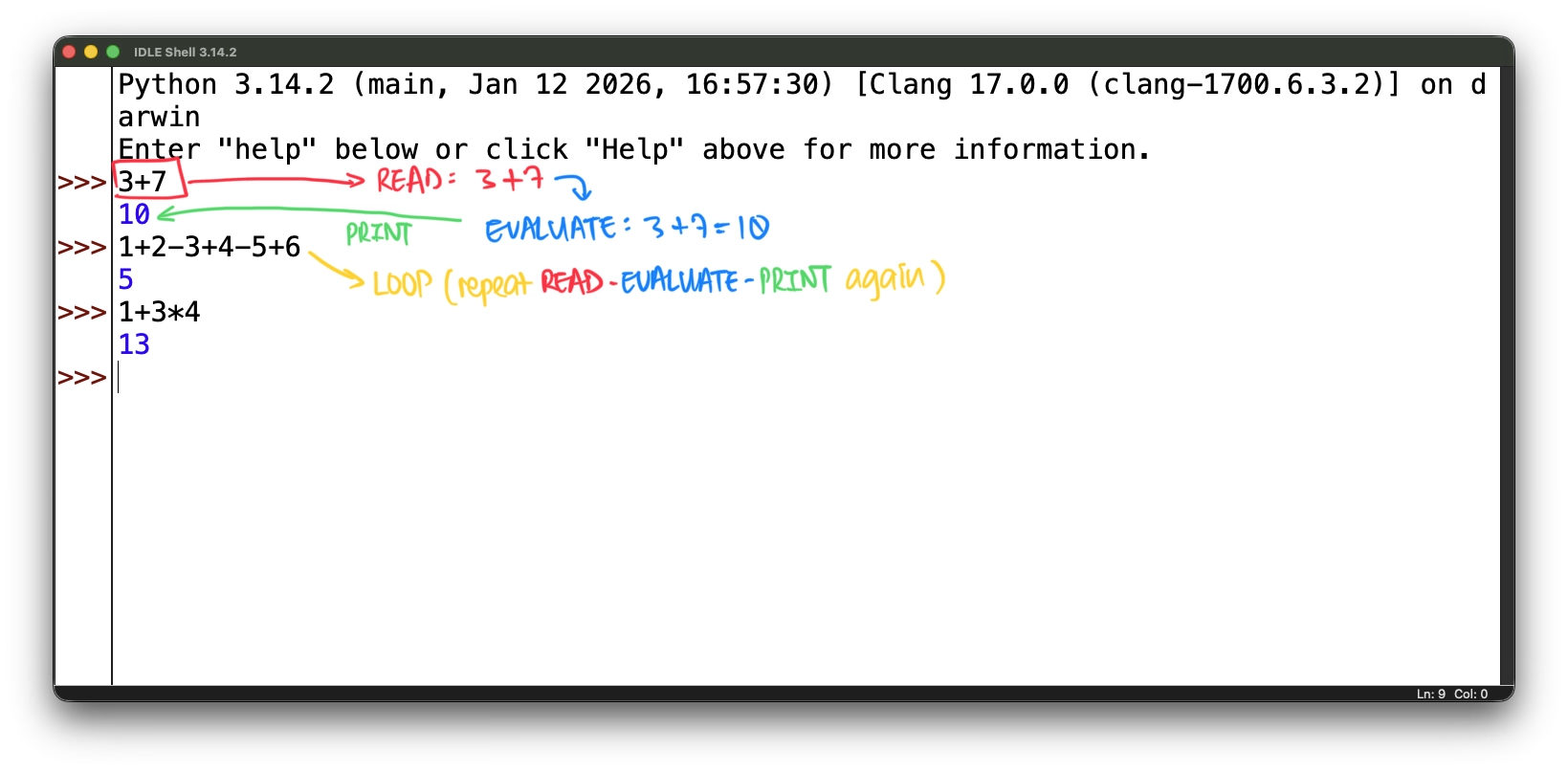
Note that during each time you execute a line of code in the Python shell, it goes through what's known as REPL (Read-Execute-Print Loop):
- Read the entered command/statement/code
- Execute the entered command/statement/code
- Print the obtained result from executing the command/statement/code
- Loop - repeat R.E.P. all over again with the next entered command/statement/code
Do note that going forward, you're not expected to do solely program on the Python shell, but rather on your code editor or IDE of choice. This, however, is a good example of how an interpreted language deals with each line of code. Interpreted languages translates (into machine code) and executes each line of code in the program. This is different to compiled languages, where all the code in the program is translated first before being executed.
The differences between both approaches introduce differences including different pros and cons. In Python's case as an interpreted language, it is often slower due to runtime overhead, but does not require much other than an interpreter (in contrast to OS-specific compilers), making it more portable across platforms. Additionally, errors are detected only when the Python interpreter reaches the offending line.
Feel free to learn more about compiled and interpreted code here:
Operators
Operators are what we use to perform computations or manipulate data. They can come in the form of symbols, combinations of symbols, or specific keywords.
There are several categories of operators (and it'd take a long time to get through all of them if I tried putting everything in) - feel free to search up more about them as you go.
Assignment Operator
The first operator you should know about is the assignment operator =.
No, this is not the same as equals like in mathematics.
It's for assigning values to a variable.
>>> # Example
>>> my_age = 18   # we assign `my_age` with value 18
>>> my_age
18
>>> my_age = 28   # we re-assign `my_age` with value 28
>>> my_age
28
Since Python is dynamically-typed (i.e., variables' values can change at any time upon re-assignment), you can proceed to change the value of any variable to a value of a different type if you so please!
>>> # Example
>>> x = 7   # we assign `x` with integer value 7
>>> x
7
>>> x = "Diary of a Wimpy Kid"  # we now assign `x` with a string value
>>> x
'Diary of a Wimpy Kid'  # Python typically uses single quotes for printing strings
Arithmetic Operators
Arithmetic operators are your standard math operators - do take note of a couple of them which are different from what you may be used to from previous languages. Binary operators require values on both sides, whilst unary operators just require a value on one side (usually the right-hand side).
| Operator | Meaning |
|---|---|
+ |
Addition (binary); indicates positivity (unary; e.g., +a means positive a) |
- |
Subtraction (binary); indicates negativity (unary; e.g., -a means negative a) |
* |
Multiplication |
/ |
Division (e.g., 15/2 = 7.5) |
// |
Integer Division (e.g., 15//2 = 7) |
% |
Modulo/Remainder (e.g., 15%2 = 1, where \(15\div 2 = 7\text{ rem }1\)) |
** |
Exponent (e.g., 3**2 = 9) |
For both addition + and multiplication * operators, these can be used on strings:
+can act as a string concatenator (e.g.,"abc" + "def" = 'abcdef')*can be used to repeat a string a specific number of times (one of the operands must be a non-negative integer; e.g.,"ab" * 3 = 'ababab')
For the integer division // operator, the result will be an integer if and only if both the dividend and divisor are integers.
This means something like 15.0//2 and 15//2.0 will give you 7.0.
For the modulo/remainder % operator, something like -17 % -3 will equal -2.
Here's why:
- To evaluate
-17 % -3, Python first evaluates what-17 // -3is first. This results as-17 // -3 = 5. - Python then calculates
-17 % -3like this:
One rule of thumb when it comes to the modulo/remainder operator, though, is that the evaluated value will always share the same sign as the divisor (second number).
For example, both -17 % 3 = 1 and 17 % -3 = -1.
Comparison Operators
All comparison operators evaluate to a Boolean value True or False.
These are binary inequality operators which compare values on both sides, and return the appropriate Boolean value according to what the Boolean expression gives.
| Operator | Meaning |
|---|---|
< |
Less than |
<= |
Less than or equal to |
> |
More than |
>= |
More than or equal to |
== |
Equals to (it's not =, that's the assignment operator!) |
!= |
Not equals to |
Note that they work best when both compared values are at least of the same type, or of the same value.
This means something like 5 != "5" will still compute, but 5 != "2" will raise a TypeError instead.
Boolean Operators
There are 3 Boolean operators: or, and, not.
- With the
oroperator, the Boolean expression evaluates toTrueif either LHS or RHS evaluates toTrue. It will evaluate toFalseif and only if both LHS and RHS evaluate toFalse. - With the
andoperator, the Boolean expression evaluates toTrueif and only if both LHS and RHS evaluate toTrue. It will evaluate toFalseif either LHS or RHS evaluate toFalse. - Applying the
notoperator on a Boolean expression inverts its evaluated Boolean value. That is, if the Boolean expression we calltest_exprisTrue,not test_exprwill evaluate toFalse. Similarly, iftest_exprisFalse,not test_exprwill evaluate toTrue.
Short-circuit logic is a concept pertaining to expressions with Boolean operators. Essentially, how such expressions are computed is first evaluating the left hand side (LHS) first, which could consequentially mean safely ignoring the right hand side (RHS) of said expressions. How this shortcut concept works depends on the Boolean operator is used.
- In a complex Boolean expression using the
oroperator, if the LHS isTrue, the RHS is immediately ignored and the whole expression is evaluated toTrue. Otherwise, the RHS gets computed to check if it evaluates toTrue. I call this the optimistic approach. - In a complex Boolean expression using the
andoperator, if the LHS isFalse, the RHS is immediately ignored and the whole expression is evaluate toFalse. Otherwise, the RHS gets computed to check if it evaluates toFalse. I call this the pessimistic approach.
There are also what we call truthy and falsy values - we will delve into them deeper in one of the lab activities here later.
Operator Precedence
There is an order in which expressions are evaluated. The table below depicts the operators with the highest precedence on top and the ones with the lowest precedence at the bottom:
| Operator | Description |
|---|---|
** |
Exponentiation |
+x, -x,~x, |
Unary positive, unary negation, bitwise negation |
*,/,//,% |
Multiplication, division, integer division, modulo/remainder |
+, - |
Addition, subtraction |
<<, >> |
Bitwise shifts |
& |
Bitwise AND |
^ |
Bitwise XOR |
| | | Bitwise OR |
==, !=, <, <=, >, >=, is, is not, in, not in |
Comparisons, identity, membership |
not |
Boolean NOT |
and |
Boolean AND |
or |
Boolean OR |
:= |
Walrus operator |
More about operator precedence (or about operators in Python overall) here.
Something IT5001 students should take note of
For the written exams in NUS IT5001, students will encounter questions requiring them to evaluate results of expressions. If this is you, you will also need to learn about operator precedence (something like BODMAS or PEMDAS, if you've heard of it before).
There are more operators in Python, but we will stick to familiarizing ourselves with these for the time being. The other operators will be introduced later on as soon as the correct contexts arise.
Lab Activity 01: Plug and Play
Let's do something very simple - for those of you who studied Physics before, some of the most rudimentary formulas you would have encountered are those pertaining to kinematics. Specifically, these dabble with displacement, velocity, and acceleration. We shall focus solely on three specific formulas (one for each part).
Each of these formulas will use a varied combination of information:
- displacement (\(s\))
- velocity (\(u\) for initial, \(v\) for final)
- acceleration (\(a\))
- time (\(t\))
Oh, and if you're not familiar with this before - don't worry. Your job in this lab activity is to replicate the given formulas to you in Python syntax. While some knowledge in basic algebra can be handy, no prior knowledge about kinematics is necessary here.
Part 1
For a ball in motion in a vacuum environment, assume that you were told that the initial velocity \(u\) and final velocity \(v\) are 1.0m/s and 4.5m/s respectively. Given that this ball travelled for 7s, find the acceleration \(a\) of this ball.
Formula to use: $ a = \frac{v-u}{t} $
Complete the program below by entering the correct expression resembling the formula given above.
Questions: Understanding Error Outputs
Observe what happens when you remove the first line from earlier, and leave the expression for a as follows:
It prints out what we call a stack trace, which is useful for understanding what went wrong with our code.
- What does the last line (i.e.,
NameError: name 't' is not defined) mean? - What does it mean for something to not be defined?
- What does the second line (i.e.,
File "/path/to/file/test.py", line 4, in <module>) mean? - What information does this give you about the offending error?
- How would you fix this program?
Part 2
For a ball in motion in a vacuum environment, assume that you were told that the initial velocity is 5m/s. The ball then travelled 6m forwards from the origin point, and during this time the ball accelerated 2m/\(s^2\). What is the final velocity of the ball as soon as it travelled that far?
Formula to use: $ v^2 = u^2 + 2as $
Hint
The given formula states \(v^2\) as the subject. What would you need to derive \(v\) from this?
Part 3
For the same scenario in Part 2, without calculating the final velocity, how long did this ball travel for?
Formula to use: $ s = ut + \frac12 at^2 $
Complete the multi-step process in the program below:
Hint
Rework the given formula to make \(t\) the subject.
Answer check:
Lab Activity 02: Turtle
I wrote up a full guide on how to use Python's turtle library here.
Take your time to run through the whole thing, but for now I will only dabble into a bit of it -
Run the following code:
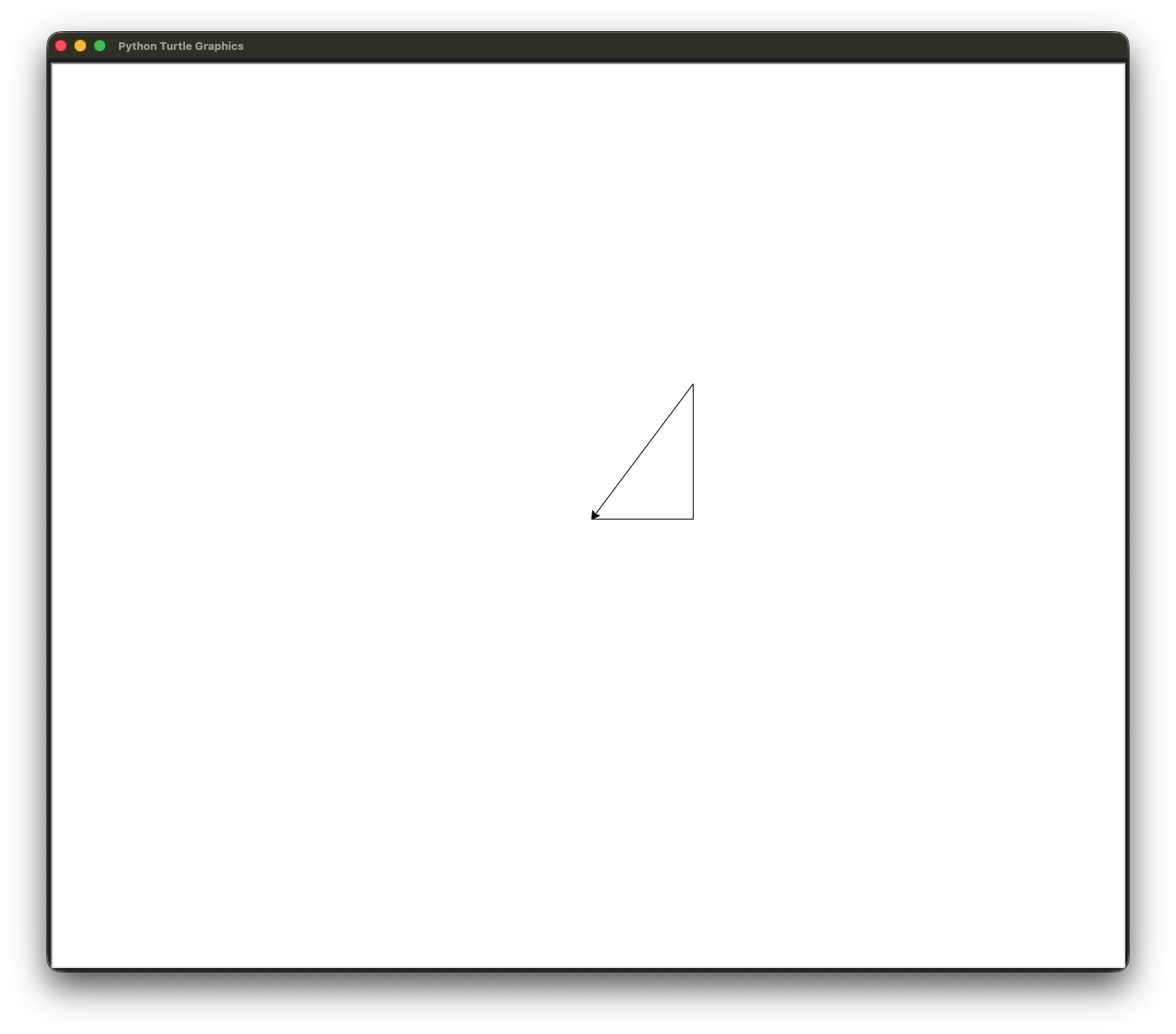
This right-angled triangle should come out as output:
Task
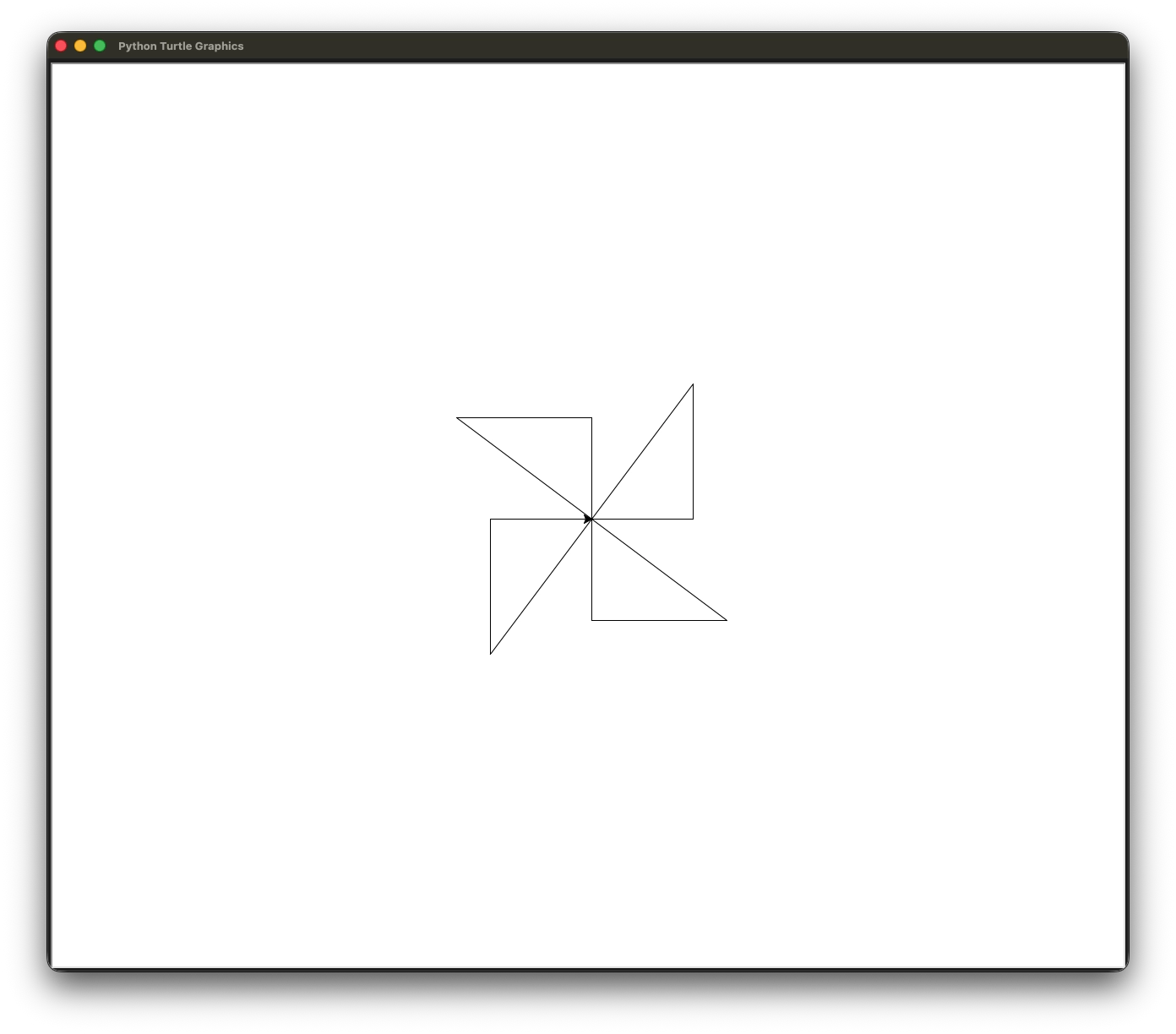
Try to modify your code to produce this pinwheel shape using the same right-angled triangle shape you created from earlier. Revisit this lab exercise anytime you learn something new - try to come up with the least verbose or the most efficient way possible to replicate this shape, or something more complicated than this.
Questions: Overriding Keywords
Suppose the code given to produce the right-angled triangle was edited such that it gives an error stack trace:
Notice that after adding a new line 7 here, we are told that a TypeError was raised.
-
What does the last line (i.e.,
TypeError: 'int' object is not callable) mean? -
Note that because we defined
degreesas an integer value90, it overrides the definition of methoddegrees()from themathlibrary. Why? -
What can we do to prevent such errors from being raised?
Lab Activity 03: Truthy and Falsy Values
In Python, every object (this includes data types too) has an inherent Boolean value when used in context. This is known as "truthiness" or "falsiness". To best explain what truthy values are, it's easier to list out what are the falsy values to look out for (it's finite compared to the former).
- Falsy values include
0, empty sequences (""/'',[],{}),None,False. - Truthy values are any other value.
This is a worksheet lab activity - for each expression below, try to compute the answer without using the Python interpreter. Then, compare your answers against what the Python interpreter says.
Part 1: Truthy and Falsy Values with the not Operator
not 0not 2not ''not "xyz"
Solution
| Expression | Answer |
|---|---|
not 0 |
True |
not 2 |
False |
not '' |
True |
not "xyz" |
False |
For each of these expressions, Python evaluates:
0\(\rightarrow\)False(then inverted toTrue)2\(\rightarrow\)True(then inverted toFalse)''\(\rightarrow\)False(then inverted toTrue)"xyz"\(\rightarrow\)True(then inverted toFalse)
The not operator in Python is strictly a Boolean operator.
Hence, it does not convert the inverted value into the former object's data type it previously took on.
Part 2: Truthy and Falsy Values with the Other Operators
True and 01 or 0True + 1False * 50 + (not 1)
Solution
| Expression | Answer |
|---|---|
True and 0 |
0 |
1 or 0 |
1 |
True + 1 |
2 |
False * 5 |
0 |
0 + (not 1) |
0 |
Unlike the not operator, the and and or operators return the original objects in the original data type they took on.
This means for:
True and 0, the falsy0value is favored in a pessimistic approach under theandoperator's behavior. Hence,0is output between the two values.1 or 0, the truthy1value is favored in an optimistic approach under theoroperator's behavior.
With arithmetic operators, all Boolean values will flip to their integer value equivalents before being evaluated.
True values will flip to 1 and False values will flip to 0.
In technical detail, Boolean values are considered subclasses of integer values (translation: Boolean values, which are more specific, can be hierarchically derived from integer values, which are more general).
This means for:
True + 1,Trueflips to1, hence the expression evaluates to1 + 1 = 2.False * 5,Falseflips to0, hence the expression evaluates to0 * 5 = 0.0 + (not 1),not 1first evaluates toFalse. Then, thatFalsevalue flips to0, hence the expression evaluates to0 + 0 = 0.