Lab 02: Selection Statements and Loop Structures
Congratulations on getting this far, and welcome to the next lab! We will now start working with conditionals and repetition in this lab. The program control structures we will be going through here are fundamental to reducing redundant/repetitive code, which in itself would otherwise make code maintenance very cumbersome. Additionally, we will also run through pseudocode and flowcharts as a fundamental concept in algorithmic thinking, and how it can be essential to planning out how programs work.
Getting Started
Selection Statements
Selection statements (or conditional structures) are concerned with executing certain blocks of code or using a value dependent on whether specific conditions are fulfilled.
In Python, the if-else statement has been the goto for a long time when it comes to implementing such a program control structure.
However, with current and more recent versions of Python, we now also have the match case as an alternative.
The Classic if-else Statement
The classic structure for selection is the if-else statement.
Using this structure, one can dedicate code sections that will be executed only if the associated condition is True.
The code block under the else branch is executed if and only if the condition associated with the paired if statement is False.
The example given above only checks 1 condition; we may sometimes require checking multiple conditions.
To enable checking for a second condition (assuming the first condition is not True), we add what's called an elif statement.
For an associated condition (or set of conditions to be checked), there can only be 1 if statement and 1 else statement.
However, we can have none or up to several elif statements in between of the if and else statements.
Additionally, sometimes no action is needed when none of the conditions laid out are met.
In this case, we can safely omit use of the else statement.
As such, there may be times when you will only have just one if statement under which a specific block of code will run depending on the associated condition.
It is also possible for there to be the one if statement and elif statement(s) without any else statement at all.
Notice that so far, our conditions are Boolean expressions. This will also work the same way with "truthy" and "falsy" values.
| Example | |
|---|---|
Ternary Operator
If you want to assign a value to a variable or return a value based on a condition, you can consider using Python's ternary operator.
If we took the examples from earlier and use a ternary operator instead, we could get something like as follows:
| example.py | |
|---|---|
Note that with the ternary operator:
- having an
elsestatement is necesary; using this operator is discouraged if you do not have anything to assign to the value if the condition isFalse - to describe an
elifstatement, you have to follow this syntax:... else ... if condition else ... - this is for selecting values to either be assigned to a variable or returned; you can use an expression as a substitute for a value, but not a whole code block (unless you encapsulate it in a function and call it)
match Case
The match case is a relatively new selection structure in Python (introduced in Python 3.10).
This is very similar to the switch case introduced in other languages like C++ and Java, with the main difference being that instead of making equality checks, Python's match case can do more (e.g., unpack data structures, check types, etc.).
Additionally, there's no need for a break statement in Python's match case - this means only the code within the associated case is executed and it does not flow down to the rest of the match case structure.
Loop Structures
Loop structures are concerned with executing certain blocks of code several times (either definite or indefinite amount of times, or for as long as a certain condition remains True).
These are the foundation of iterative code (we will explore that in Lab 07).
The for Loop
The syntax for Python's for loop is distinctively different from most existing languages.
Unlike those languages where you set at most 3 statements, here you indicate specific range of values either by using Python's range() function, or by indicating the sequence whose items will be iterated over.
When it comes to numeric ranges, you can place anywhere between 1 and 3 integer parameters.
Depending on which number of parameters you include in the range() function, they serve different purposes:
| # Parameters | Meaning |
|---|---|
| 1 | only the stop value is defined; start value is 0 by default e.g., range(10) means iterate from 0 to 9 |
| 2 | start value is defined first, followed by the stop value e.g., range(-1, 10) means iterate from -1 to 9 |
| 3 | start value is defined first, then the stop value, followed by the step value (1 by default otherwise; cannot be 0) e.g., range(-1, 10, 2) means iterate to each second number from -1 to 9 |
>>> # iterate from 0 to 7, exclude 8
>>> for i in range(8): # (1)
... print(i)
...
0
1
2
3
4
5
6
7
- Iterator variable name need not be just
i, you can use a different name for it. Keep to meaningful names if possible!
>>> # iterate from 4 to 7, include 4 and exclude 8
>>> for j in range(4,8):  # (1)
...     print(j)
...
4
5
6
7
>>> # iterate from 8 to 4, include 8 and exclude 4 (but nothing happens)
>>> for j in range(8,4):    # (2)
...     print(j)
>>>
- Here, instead of
iwe usejas the iterator variable name. Same meaning here! - Nothing is printed since the start value is larger than or equal to the stop value. A negative step value is required to see any lines printed.
>>> # iterate through each second value between 2 and 7, include 2 and exclude 8
>>> for _ in range(2,8,2):  # (1)
...     print(_)
...
2
4
6
>>> # iterate through each third value between 2 and 7, include 2 and exclude 8
>>> for _ in range(2,8,3):
...     print(_)
...
2
5
- Note the use of the underscore
_here as the iterator variable name. This is used typically when the iterator variable does not have a notable meaning associated with it.
>>> # iterate through each value from 5 to 1, include 5 and exclude 0
>>> for k in range(5,0,-1):  # (1)
...     print(k)
...
5
4
3
2
1
>>> for k in range(5,0):    # (2)
...     print(k)
...
>>>
- The step value is set to -1 to allow decrementing of iterator variable; output is empty otherwise (i.e., nothing is printed as output). Any integer step value like 2 or -2 and further are allowed, but it cannot be 0.
- Nothing is printed since the start value is larger than or equal to the stop value.
With sequences, it's rather simple - just iterate through each value inside the sequence (strings, lists, tuples, dictionaries). The following examples shows how one could iterate through each character in a string, followed by iterating through each item in a list (we'll encounter this again when we get to sequences in Lab 04 and Lab 05).
The while Loop
With the while loop, we are concerned with whether a specified condition or statement is True before continuing the looping process.
This is more akin to all loop structures in many other languages, and Python's version of the while loop is similar to other programming languages that also have while-loop structures.
Let's try to replicate one of the examples from earlier but using a while loop - iterate from 4 to 7 using the while loop - you will require 3 components:
init: practically a setup, which can include initialization of variable(s); in this case, we need to initialize an iterator variable (let's usej) and set the value to 4cond: the condition paired with thewhilekeyword; in this case, assuming we set the iterator variable's name asj, we can use eitherj <= 7orj < 8update: usually where we specify anything that will gradually breakcondif needed (i.e., makecondbecomeFalse); here, we need to set something similar to the step value in the for loop - incrementj
Here's how it would look like in a while loop (plus another example with a different increment statement):
Here's another example where we build a randomized string up until it is 16 characters long:
>>> # create string with random upper case alphabets
>>> from random import randint  # (1)
>>> secret = ""                 # string to populate with random characters
>>> while len(secret) < 16:     # while `secret` is less than 16 characters long
...     secret += chr(randint(65,90))  # (2)
...
>>> secret
'YFLNTWAEDQCPXFIX'
- We use the
randint()function from Python'srandomlibrary to randomly select a number between a given range, both values included. This function is later used to select a random integer between 65 and 90 (both inclusive). - After selecting a random integer between 65 and 90, it is passed into the
chr()function which returns the associated character based on the given ASCII value.
Notice that here, we did not need to include update statement(s) to ensure we reach a point where the condition set is False.
continue and break
These two keywords can come in handy with skipping current iterations or prematurely halting the loop entirely.
| Keyword | Description |
|---|---|
continue |
will break the current loop and continue with the next iteration |
break |
will exit the loop without completing the current iteration if unfinished |
Here are some examples of both these keywords in use to manipulate outputs produced by a loop structure:
They can come in handy, especially if using them means requiring fewer looping structures.
Here's an example where a small list of prime numbers are generated, skipping any multiple of already included numbers using break.
>>> my_primes = []
>>> for x in range(2, 30):
...     is_prime = True  # flag value
...     for y in my_primes:
...         # if x // y gives no remainder, x is a multiple of y
...         if x % y == 0:
...             is_prime = False
...             break
...     if is_prime:   # runs if flag variable still remains True
...         my_primes.append(x)
...
>>> my_primes
[2, 3, 5, 7, 11, 13, 17, 19, 23, 29]
We use a flag value that flips when a target condition is achieved; here, flag variable is_prime becomes False when a composite integer is reached.
The flag variable's value resets to/is initalized to True during the start of each iteration from the outer loop structure.
>>> my_primes = []
>>> for x in range(2, 30):
...     for y in my_primes:
...         # if x // y gives no remainder, x is a multiple of y
...         if x % y == 0:
...             break
...     else:   # runs if inner loop does not break
...         my_primes.append(x)
...
>>> my_primes
[2, 3, 5, 7, 11, 13, 17, 19, 23, 29]
Python also has a for-else structure, such that the optional else block associated with a for loop block is run when the for loop is run without premature breaking (i.e., using break).
Infinite Loops
As the name suggests, infinite loops is practically continuous and indefinite loops. This is typically frequently due to incorrect limits.
Let's look at a simple example (same one across two languages, i.e., Python and C++):
- The iterator
i's value is set to start from 0 and end at 5. However, since the step value is set to -1, the value ofiwill continuously decrease from 0. Hence, the value ofiwill never reach 5.
Here, we declare a new variable i and set its value to 0.
The while loop that follows after is set as such that the looping persists as long as condition i < 5 remains True.
However, as i keeps decrementing by 1 each time, the condition remains True for good.
Hence, it doesn't stop (if it eventually does, I believe it usually is due to hardware interrupts).
In a web browser using JavaScript, especially, infinite loops can be pretty obnoxious where the loop will effectively hang the web browser (and subsequently you'd probably have to force quit it).
Python does not recurse infinitely, though. (Well, it can, but a stack overflow error occurs when trying to call the same function more times than can be handled.)
Flowcharts
Before getting started with coding, it's best to structure out how we want the program to function - this is what's known as an algorithm.
The way you perceive what an 'algorithm' is probably incorrect.
During conversations, I often encounter people who would personify the term "algorithm" like a sort of demonic overlord everyone needs to please. I guess this is due to how we perceive the algorithm like a brain, of which serves as the model for a neural network. As such, we then begin to relate how a live human being has a functioning brain, and given how unforgiving the outcomes of said algorithm can be, we start personifying this imaginary human being with this "functioning brain" as a cruel individual who probably relishes in making misery in social media, the content creation space, etc.
If this is you, I don't fault you - I'd chalk it up to how our complex minds work anyway. However, going forward, PLEASE, PLEASE DO NOT associate the term "algorithm" as to describe some homosapien when there isn't any!
Proper definition: An algorithm comprises of a set of detailed, unambiguous, and ordered instructions that describes the processes necessary to produce the desired output from a given input.
Sometimes, this process means crafting diagrams that describe how the program works. One of the simplest diagrams that can be created is the Flowchart Diagram. A flowchart diagrammatically shows the required steps to complete a task and the order that they are to be performed.
There are other diagrams that can be used during the software design phase of what we call the software development life cycle, but this is out of scope right now - we will talk about one more type of diagram later in one of the subsequent labs when we start going through what objects are.
Flowchart Symbols
These are the symbols used in a flowchart diagram. Search up some examples online for examples (some research papers also use this, provided the flow is simple enough to use such representation).
Pseudocode Basics
Pseudocode is another simple way of showing an algorithm. You can probably find plenty of these in various research papers - I say this because while I was a research student in Sunway, I have had my fair share of times where I had to sift through several research papers with several proposed schemes that aim to solve their respective research gaps/problems.
One thing I did feel was very frustrating was when the author(s) used a non-standard way of laying out their pseudocode (if any). This ground my gears a little; it's as if there was no consistent way to write out pseudocode without making it a lazy interpretation of the real program code itself. Hopefully with this, I can at least shed some light on how I'd imagine proper pseudocode be written.
I will adhere to the following format when writing out pseudocode:
- keywords (e.g.,
INPUTare to be written in upper-case) - names of variables will follow the same Snake Case convention as encouraged in Python, though Pascal Case or Camel Case is also welcome (just keep it consistent throughout)
- where conditional and loop structures are used, repeated or selected statements are indented by two spaces (a usual one-finger paragraph spacing is fine if you're writing it on paper)
- if there are no dedicated keywords in pseudocode language for a specific function (e.g.,
int()), you may revert to language specific notation (or preferably something that appears language agnostic)
So apparently I found out something about why different Pseudocode formatting exists..
I have since figured out some prefer a C-styled approach, which is reasonable for those who already program. That being said, I would still rather play it safe and apply something even layman folk can understand.
Assignment Statements
A value is assigned to an item/variable using the operator. The variable on the left of the is assigned the value of the expression on the right. The expression on the right can be a single value or several values combined with any mathematical operators. You may use the existing operator notations in Python, or follow a language-agnostic notation like as follows:
| Mathematical Operator | Meaning |
|---|---|
+ |
Addition |
- |
Subtraction |
* |
Multiplication |
/ |
Division |
^ |
Exponent |
() |
Group |
Examples:
| Statement | Meaning |
|---|---|
Cost <- 10 |
Cost has value 10 |
Price <- Cost * 2 |
Price has value 20 |
Tax <- Price * 0.12 |
Tax has the value 2.4 |
SellingPrice <- Price + Tax |
SellingPrice has the value 22.4 |
Gender <- "M" |
Gender has the value 'M' |
Chosen <- False |
Chosen has the value False |
Conditional Statements
Here's an example and the equivalent Python code:
Here's another example and the equivalent Python code:
OUTPUT "Enter num_1 >> "
INPUT num_1
OUTPUT "Enter num_2 >> "
INPUT num_2
OUTPUT "Enter choice >> "
INPUT choice
CASE OF choice
  1:
    answer <- num_1 + num_2
  2:
    answer <- num_1 - num_2
  3:
    answer <- num_2 - num_1
  4:
    answer <- num_1 * num_2
  OTHERWISE
    OUTPUT "Invalid choice"
    answer <- None
ENDCASE
IF answer != None
  THEN
    OUTPUT answer
ENDIF
Loop Structures
Lab Activity 01: Design First, Then Develop
I want you to hold off from programming out the solution immediately here. Read the task, draft out either a flowchart or pseudocode of how the program should go first. Then only afterwards, program out your solution based on your program design.
Task
The Body Mass Index (BMI) is a measure of health on weight. A person's BMI is calculated by taking the person's weight (in kilograms) divided by the person's height squared (height in meters). The formula to calculate a person's BMI using these two measurements (with the respective metric S.I. units) is as follows:
Create a BMI script that takes in both a person's weight and height as values to interpret the person's BMI. The respective BMI interpretations are as follows:
- BMI \(\le\) 18.5: Underweight
- 18.5 \(\leq\) BMI \(\le\) 25.0: Normal
- 25.0 \(\leq\) BMI \(\le\) 30.0: Overweight
- BMI \(\geq\) 30.0: Obese
Extra considerations:
- Both weight and height are scalar values, so negative values. No zeros either.
- If any of these two required inputs is negative, print an error message and prompt the user for the associated input again. (refer to Sample Output 2)
Extra Task
Modify the program to ask the user if the weight and height are provided in metric units (kg and m respectively) or imperial units (lb. and in. respectively). The formula to calculate a person's BMI given the weight and height in imperial units is as follows:
Lab Activity 02: Turtle Again
The following code produces a drawing of a parallelogram as follows:
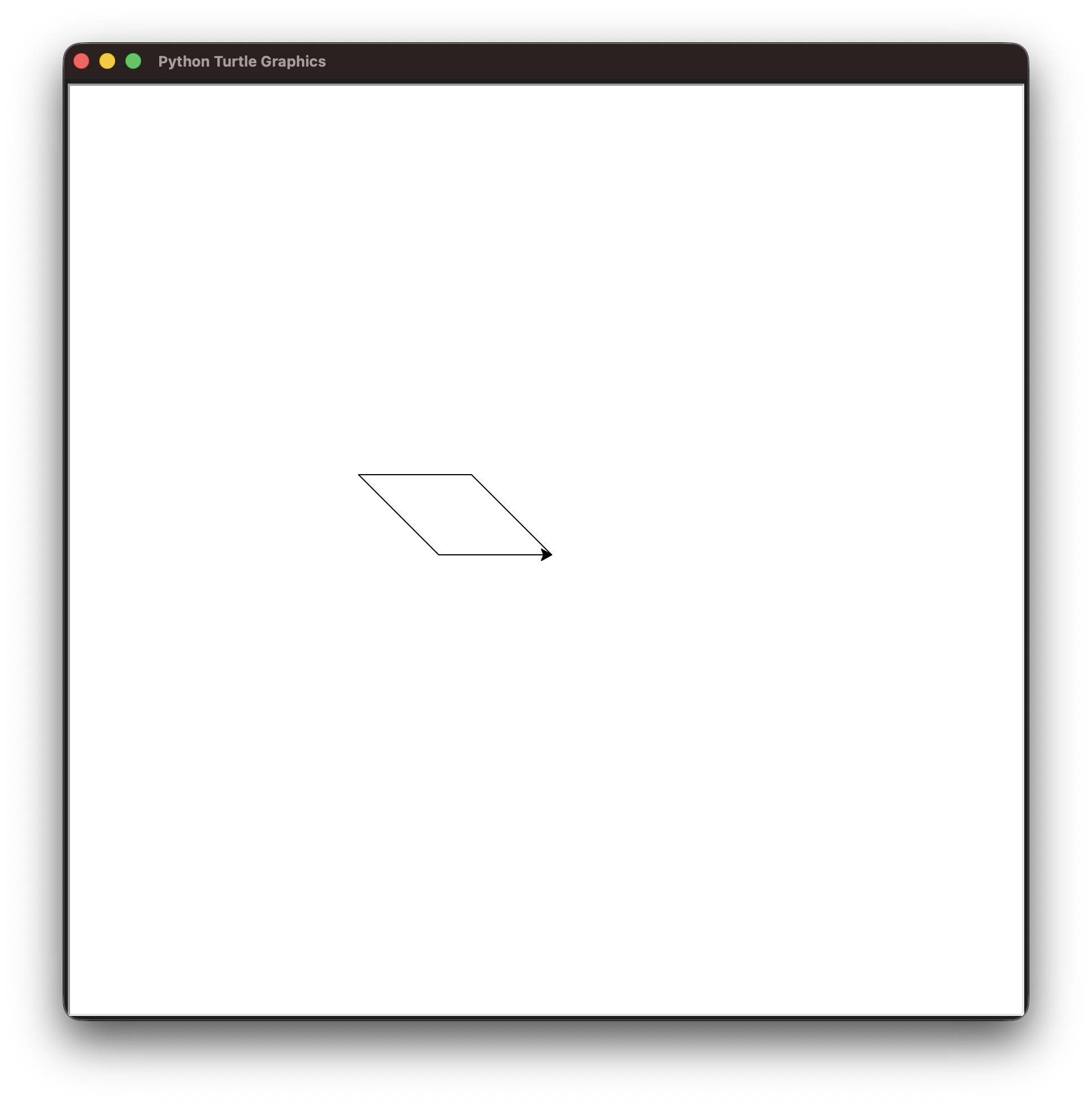
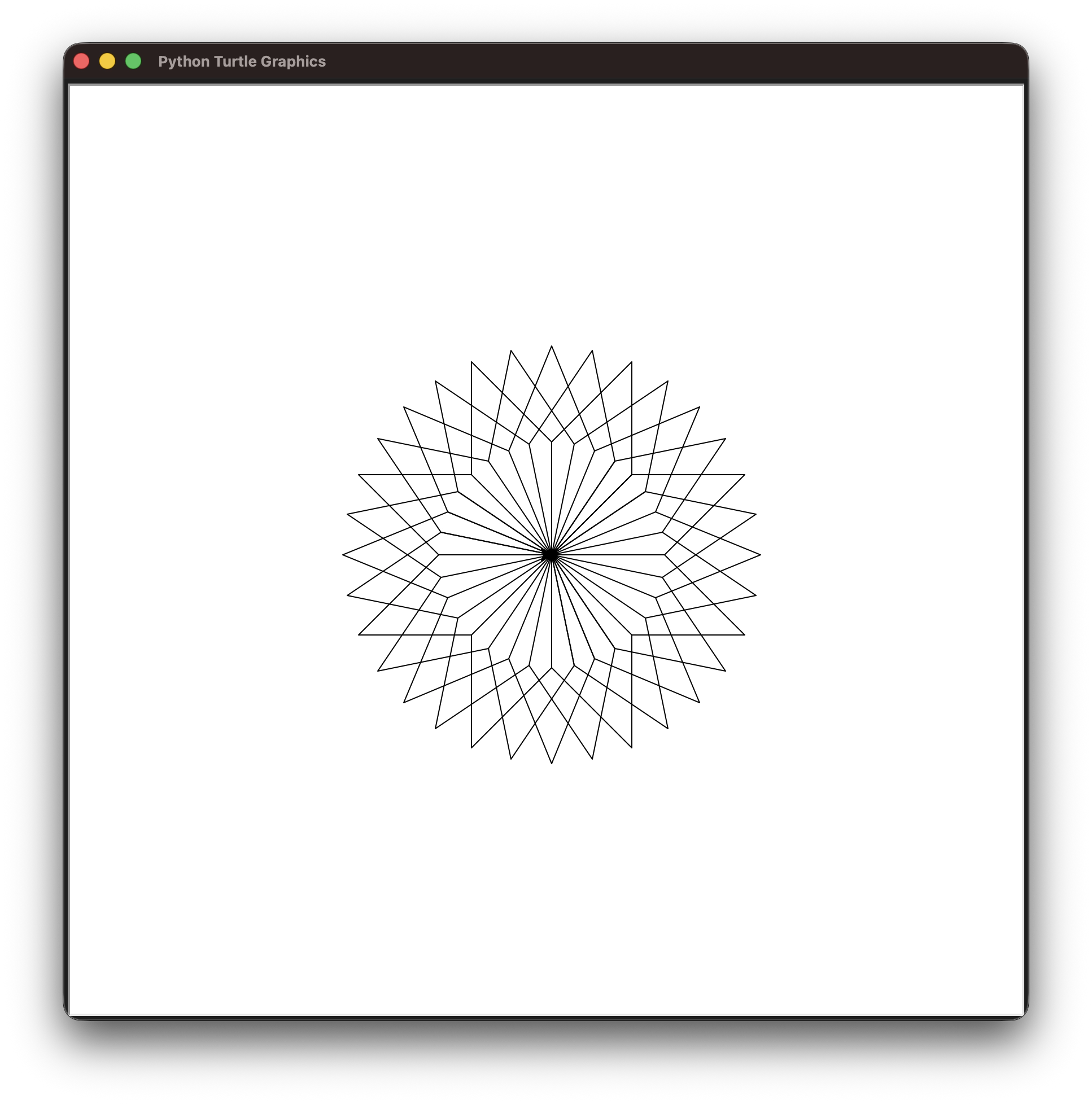
Create a regular 32-petal flower drawing with this parallelogram.
You are required to use a loop structure for this activity; excluding import statements and any empty lines, the maximum total number of lines is 12.
Try experimenting use of the for and while loops and see which solution feels easier to come up with.
Lab Activity 03: Simon Says
"Simon Says" is a simple game one person (regarded as "Simon") gives instructions to the other players. The other players then need to follow the instructions that start with "Simon says", and disregard those that do not start with "Simon says" otherwise.

The game to be implemented in Python is simple - it continues as long as we do not accidentally follow instructions that do not start with "Simon says" or disregard instructions that do. Specifically, the player loses the game if one of the following occurs:
- Simon instructs beginning with "Simon says", but the player does not follow the instruction.
- Simon instructs without beginning with "Simon says", but the player follows the instruction.
The way how instructions are followed or disregarded is by entering a number associated with the appropriate action. Here are some potential instructions to implement:
- Cover your nose
- Cover your eyes
- Cover your ears
- Shrug
- Clap your hands
- Do nothing
You can add more or change them if you so please in this lab activity. For simplicity, I would strongly suggest using just integer values to represent an instruction in the game.
Here's a sample output of how the game should run:
Simon says cover your eyes
Your response >> 2
Do nothing
Your response >> 4
Simon says do nothing
Your response >> 4
Game over, your score: 1
Let's now start with the given code below:
We will make use of two functions (i.e., simon_says() and simon_check()) to contain some logic using the program control structures you have been introduced to in this lab activity.
Task 1: Understand Global Code
Before we begin working on the function code, let's take a step back and understand what is provided outside of those functions first. Try to answer the following questions first before peeking at the elaboration I have provided.
What does the while loop at line 21 do?
Here, we use an infinite loop to run through as many rounds of this game as possible, until the player loses.
simon_choice and instruction are an int and a str respectively, obtained from the function simon_says().
This function, when run, will return a random choice as an integer (which indicates what Simon wants to instruct) as well as his instruction as a string.
If this function receives an integer choice called instruction_no (by default, it is set to None), the function will only return Simon's instruction as a string.
What does line 25-26 do? Break down the expression used in the if statement.
The expression associated with the if statement at line 25 here is just a function call that takes in three parameters.
Task 2: simon_says()
Inside this function, we get a member function speak_at_first().
What does speak_at_first() do?
This function randomly returns the string "Simon says " when executed. One could argue that this function is not as necessary, as this itself can be done without one. However, one could also argue that it's easier to see that something is done to automate a random chance that Simon would properly give the instruction with "Simon says" at first.
The randomization happens with using the library function choice() from the random library.
This function takes in an iterable of choices to pick from at random; in this case it chooses either True or False at random.
One could use a different random library function like random() or uniform() to further manipulate the odds of Simon saying "Simon says" first.
When the code is run, Simon gives an instruction (which may or may not include the prefix "Simon says"). The program then requests for a keyboard input (of which is to capture the number associated with an instruction).
Complete the function simon_says() so that it carries out this process.
Task 3: simon_check()
Complete simon_check(), which takes in three parameters:
user_input: an integer, the user's choiceinstruction_no: an integer, the number associated with the randomized instructed actionsimon_nice: a Boolean,Trueif the instruction was given with "Simon says" at first, andFalseotherwise