Lab 03: Functions and Variable Scope
So far, you have used a couple of functions to complete some tasks. In this lab, we will be delving a bit further into the inner parts and workings of a function, how to create one, as well as introduce the idea of variable scope.
Getting Started
To best describe how a function behaves, we could go into how functions work in mathematics and go ahead from there, but I think the Information Processing Cycle would be a better way to describe this. Arguably, using the definition of a computer would be much easier to understand rather than what goes under the hood of your stereotypical function \(f(x)\).
Information Processing Cycle

If we had to define what a computer is, I'd define it as a device capable of following instructions to accept input, process that input, and produce information (output). This follows a concept what we call the Information Processing Cycle. Input, processing, output - that's generally what it is.
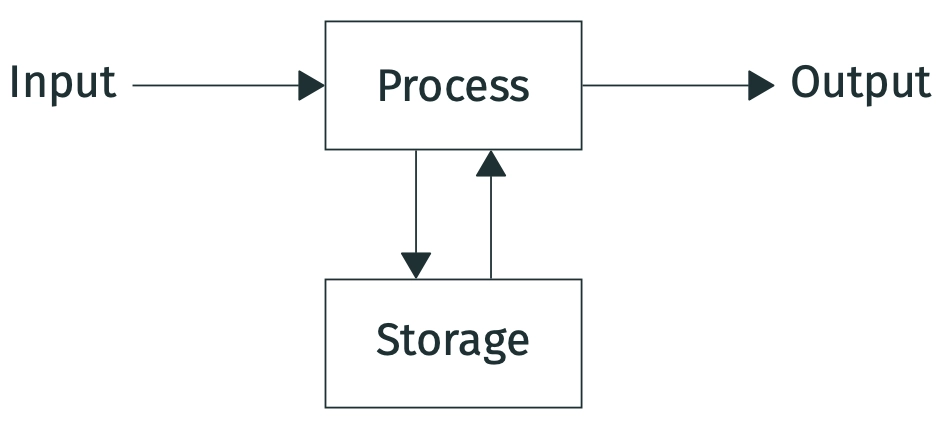
There are 4 stages in the Information Processing Cycle:
- input: data or instructions that are entered into a computer
- process: action(s) or routine(s) performed by a computer to convert input into output
- output: processed data or information
- storage: information that is stored for future use and retrieval
How does this relate to a function? Answer: Functions behaves the same way.. mostly.
Structure of a Function
Many functions work by retrieving input(s) to produce output(s). There may be functions which do not require inputs, or return meaningful outputs.
- These inputs are called parameters. Functions may require these as part of its process, but more often than not they are intentional. There's no limit to how many parameters a function can have, and additionally some can be deemed optional (optional parameters are declared at the very end after all the compulsory ones).
- Functions return output(s).
The keyword here is
return, which describes a product being produced upon completing the function's process. However, there are functions that do not return anything (technically they do, see below).
Functions can return nothing??
Well, visually it looks that way (and that's where I'd normally stop at if I was confusing anyone on first pass).
However, all functions in Python actually return something.
By default, functions will return None by default unless stated otherwise.
From the Python shell, this is only obvious if you printed such a function out, not just by calling it.
The following visual details the parts of a typical function in Python.
In comparison, let's observe how an arbitrary mathematical function works. Say we have function \(f(x) = 5x+6\). The name of this function here is \(f\), and it requires an input/parameter \(x\). By providing this input \(x\), the expression \(5x+6\) is the process this input goes through to transform into this function's output. For instance, if we provided an input \(x=1\), the output of \(f(1) = 5(1)+6 = 11\). With input \(x=2\), we get \(f(2) = 5(2)+6 = 16\). Inputs \(x=1\) and \(x=2\) here are transformed using function \(f\) to produce outputs \(11\) and \(16\) respectively.
Pretty similar to how functions work in Python so far, right? With mathematical functions like this one or more established ones like the trigonometric functions sine (i.e., \(\sin(x)\)), cosine (i.e., \(\cos(x)\)) and tangent (i.e., \(\tan(x)\)), I believe it's a bit simpler in a sense that inputs are required (and on a more elementary level you mostly see one-parameter functions) and outputs are expected. With functions in Python or programming in general, that rule is not a guarantee.
Function Scope
Let's take a look at this simple program right here.
Global and Local Variables
In the context of computing, when we say something is...
- global, it operates or is applied through the whole of a file, program, etc.; e.g., global searches
- local, it is only available for use in one part of a program (from a computer networking standpoint, a local device is something that can be connected to without use of a network)
Source: New Oxford American Dictionary (available from Apple's Dictionary app)
Lab Activity 01: Let's Create Some Functions!
For this lab activity, you will be given progressively tougher tasks, but all of them are pretty doable.. I promise! Input-output pairs to help you verify if your functions work as intended.
Function 1
Let's start with a simple function that only prints out the text "Hello World!" when called.
No inputs needed.
Name this function my_hello().
Lab Activity 02: Calculating Tax
"In this world, nothing can be said to be certain, except death and taxes."
- Benjamin Franklin
This activity will assume tax calculations are like that in Malaysia and Singapore. Examples will follow the tax rates in Malaysia for the Year of Assessment 2025.
| Chargeable Income (RM) | Calculation |
|---|---|
| 0 - 5,000 | For amounts up to RM5,000, charge RM0 |
| 5,001 - 20,000 | On the first RM5,000, charge RM0 Then charge the next RM15,000 at rate 1% |
| 20,001 - 35,000 | On the first RM20,000, charge RM150 Then charge the next RM15,000 at rate 3% |
| 35,001 - 50,000 | On the first RM35,000, charge RM600 Then charge the next RM15,000 at rate 8% |
| 50,001 - 70,000 | On the first RM50,000, charge RM1,800 Then charge the next RM20,000 at rate 13% |
| 70,001 - 100,000 | On the first RM70,000, charge RM4,400 Then charge the next RM30,000 at rate 21% |
| 100,001 - 250,000 | On the first RM100,000, charge RM10,700 Then charge the next RM150,000 at rate 24% |
| 250,001 - 400,000 | On the first RM250,000, charge RM46,700 Then charge the next RM150,000 at rate 24.5% |
| 400,001 - 600,000 | On the first RM400,000, charge RM83,450 Then charge the next RM200,000 at rate 25% |
| 600,001 - 1,000,000 | On the first RM600,000, charge RM133,450 Then charge the next RM400,000 at rate 26% |
| 1,000,001 - 2,000,000 | On the first RM1,000,000, charge RM237,450 Then charge the next RM1,000,000 at rate 28% |
| 2,000,001 and up | On the first RM2,000,000, charge RM517,450 Then charge the remainder at rate 30% |
We will be creating two functions this time, one huge function will obtain a chargeable income amount and return 3 values: the tax rate, the income tier (indicated by what is the chargeable income greater than), and the base tax amount (the maximum payable tax amount from the previous income tier).
Lab Activity 03: Credit Card
Activity Reference
(adapted from Introduction to Java Programming 10th Ed. by Y. Daniel Liang)
Let's create a program that will check if a credit card number is valid!
In 1954, Hans Luhn of IBM proposed an algorithm for validating credit card numbers.
The algorithm is useful to determine whether a card number is entered correctly, or whether a credit card is scanned correctly by a scanner.
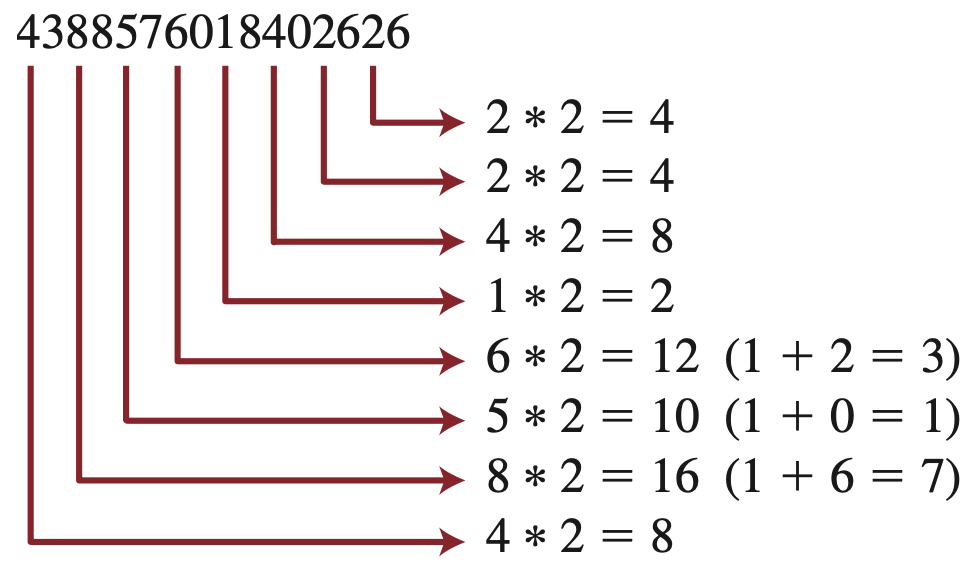
Credit card numbers are generated following this validity check, commonly known as the Luhn check or the Mod 10 check, which can be described as follows (for illustration, consider the card number 4388 5760 1840 2626):
Task 1: Sum of Double Even Places
-
Double every second digit from right to left. If doubling of a digit results in a two-digit number, add up the two digits to get a single-digit number.
-
Now add all single-digit numbers from Step 1. $$ 4 + 4 + 8 + 2 + 3 + 1 + 7 + 8 = 37 $$
Write a function called sum_of_double_even_place() which takes in an integer input card_num and carries out the above two steps to return the sum of double the digits in even places.
Even Place Digits and Odd Place Digits
Note that here, we define even and odd placing based on the index of strings.
| 0 | 1 | 2 | 3 | 4 | 5 | 6 | 7 | 8 | 9 | 10 | 11 | 12 | 13 | 14 | 15 |
|---|---|---|---|---|---|---|---|---|---|---|---|---|---|---|---|
| 4 | 3 | 8 | 8 | 5 | 7 | 6 | 0 | 1 | 8 | 4 | 0 | 2 | 6 | 2 | 6 |
- This means that the digits in even placing are (from left to right): 4, 8, 5, 6, 1, 4, 2, 2.
- The digits in the odd placing are (from left to right): 3, 8, 7, 0, 8, 0, 6, 6.
Tip 1: Iterating through Each Even Place Digit
You could first cast card_num into a string data type, and then retrieving each digit as they come from left to right - in fact, this is one way to go about the problem if you want to build this as a one-liner function.
One complication that could come here is that as soon as you retrieve each digit, you have to cast it into an int data type before being able to carry out the math operations on it.
Another way would be to retrieve the digits in a backwards fashion. That way, we can immediately use mathematical operations on it without needing to cast it back into an int format first. Also, the order in which you retrieve this digits does not matter. Going in a backwards direction would not impede how the summing works.
We can carry this out using a while loop:
| card.py | |
|---|---|
Note the use of the modulo/remainder % and the integer division // operators here.
However, as is, the given code will iterate through each digit regardless of whether it is even placed or not.
Modify the highlighted line such that it is able to skip to the next even place digit.
Tip 2: Retrieving Digit to Add to Sum
Given our example card number, the digits in the even place are (from right to left/back to front): 2, 2, 4, 1, 6, 5, 8, 4.
| Even Place Digit | Digit \(\times 2\) | \(\ge 10\)? | To Add |
|---|---|---|---|
| 2 | \(2\times 2 = 4\) | No | \(4\) |
| 2 | \(2\times 2 = 4\) | No | \(4\) |
| 4 | \(4\times 2 = 8\) | No | \(8\) |
| 1 | \(1\times 2 = 2\) | No | \(2\) |
| 6 | \(6\times 2 = 12\) | Yes | \(1 + 2 = 3\) |
| 5 | \(5\times 2 = 10\) | Yes | \(1 + 0 = 1\) |
| 8 | \(8\times 2 = 16\) | Yes | \(1 + 6 = 7\) |
| 4 | \(4\times 2 = 8\) | No | \(8\) |
We will include this process as part of the while loop procedure:
Note that here, when it comes to multiplying each retrieved digit by 2, the maximum result is 18 (\(9\times 2 = 18\)), which is 2 digit places long.
To sum each of these places up, using the modulo/remainder % and integer division // operators once to retrieve each digit place's value is enough.
Complete the addition process by adding the digit to total_sum.
Task 2: Sum of Odd Places
Add all digits in the odd places from right to left in the card number. $$ 6 + 6 + 0 + 8 + 0 + 7 + 8 + 3 = 38 $$
Write a function called sum_of_odd_place() which takes in an integer input card_num and returns the sum of the digits in odd places.
Task 3: Check Card Validity
-
Total up the two sums. $$ 37 + 38 = 75 $$
-
If this total is divisible by 10, the card number is valid; otherwise, it is invalid. In our example here, card number
4388 5760 1840 2626is invalid because \(75 \div 10 = 7 \text{ remainder } 5\). If you have a bank card with you, provided you followed and carried out the steps here correctly, your program should say that it is valid.
Write a function called is_card_valid() which takes in an integer input card_num and returns True if the card number is valid, or False otherwise.
Danger
If you decide to keep your solution in online storage like OneDrive or GitHub for instance, please ensure that you remove all traces of your card numbers! This is considered sensitive personal information, and you would do good to ensure that you do not unnecessarily put yourself at risk by revealing your bank card details to the whole world!
The example here shows an invalid credit card number, which poses no risk since at the time of putting this up, this number will not be used on any card out there.
Additional Task: Credit Card Categorization
Visa, Mastercard, and American Express are just 3 of several card networks used. Typically, the first 6 digits in a bank card number will define what is known as Bank Identification Numbers (BINs). Depending on which card network is being used, the first few digits in the BIN will take on some prefix by default. (Visit HERE for more information about this.)
For these three card networks, card numbers will generally start within the following prefix ranges:
| Issuing Network | Valid Prefixes |
|---|---|
| American Express (AMEX) | 34, 37 |
| Mastercard | 51 - 55 |
| Visa | 4 |
Write a function called get_issuer() which takes an integer input card_num and returns the name of the issuing network if any, and "No Issuing Network Found" otherwise.
Further Consideration for Checking Card Number Validity
How would you modify is_card_valid() to also check if the card number starts with a known prefix used by an issuing network?